Apple Watch · iPhone companion01
Phone down. Set logged.
Log weight and reps from your wrist. Rep counting supports common lifts, with a chance to confirm or correct the count.
Your gym, in your pocket. Plates, stacks and gym presets — with insights that put every session in perspective.
The plates on your bar. The machines at your gym. The patterns in your training. Finally, a workout log that connects them.
Xenitia knows what you’re lifting on. A barbell shows the plate calculator, a cable machine shows its stack, dumbbells and kettlebells show the rack. Drag exercises to reorder mid-session — drop two together and they become a superset.
Pick the plates per side. The bar is already counted.
Tap the pin position — your gym's exact stack, add-on weights included.
Tap any pre-configured weights that your gym actually has.
Move exercises as the floor changes. Single tap to log superset exercises all together.
Choose where you train. Xenitia brings up saved equipment presets for your exercises. Pick your machine and its weight configuration is ready to use.
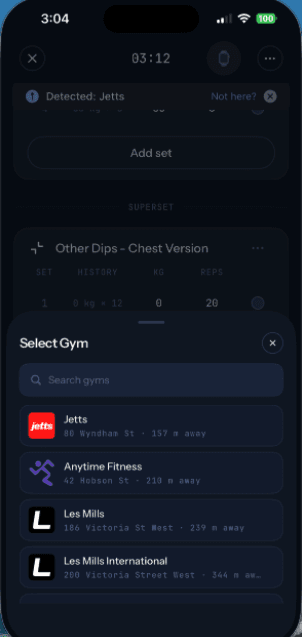
The stack, increments and add-on weights from the machine you actually use.
Matched to the exercise. Find the relevant machines at your selected gym.
Shared by the gym floor. Use configurations other members have already saved.
Make it yours. No preset yet? Set up your equipment and save it for next time.
Preset availability depends on the equipment saved at each gym.
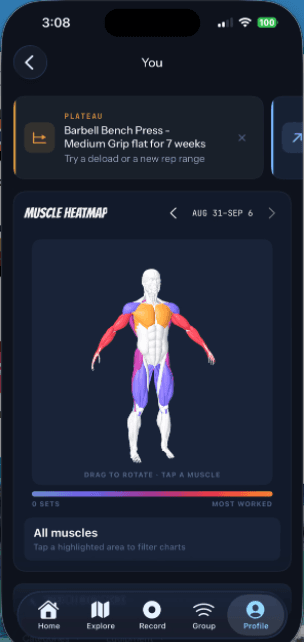
A lift that has stalled. A new personal best. A muscle group that needs more attention. See the patterns that are easy to miss between sessions.
Bench press flat
for 7 weeks.
Choose your goal, experience, available equipment and training days. Build a program on iPhone or Android, then review it, make it yours and put it on the calendar.
Save favourite sessions as routines, or build your own program. Optional AI insights require a supported iPhone and a model download.
Your first session in Xenitia doesn’t have to be day one. Import your workout history from Strong or Hevy and keep the sets, reps and weights you worked for.
CSV import for strength workouts. Review exercise matches and any skipped rows before saving.
Get a CSV export from Strong or Hevy.
Open it in Xenitia and check the exercise names.
Save your history and start your next session.
Settings → Data → Import workouts
Log weight and reps from your wrist. Rep counting supports common lifts, with a chance to confirm or correct the count.
Check off a set and the rest timer starts. Follow your workout from an iPhone Live Activity or Android ongoing notification.
Reuse a routine, carry over your previous weights, and drag exercises to reorder or group them into supersets.
Save your session on your phone and sync when you reconnect. Your workout can keep going without a signal.
Location is used only while the app is open. Watch motion data stays on your device unless you choose to share it. Programs are generated on your phone on both platforms. Export your workouts or delete your account from Settings. Read the privacy policy →Read the privacy policy →
Only people you're connected with see your profile. Go public when you want to be found.
Nobody sees that you're at the gym unless you switch it on in Settings.
Wrist motion used to improve rep detection is opt-in, and you can stop any time.
Programs are built on your phone on both platforms. Saved workouts and routines sync to your Xenitia account.
Try Xenitia on iPhone or Android. iPhone builds use TestFlight; Android testing is by invitation through Google Play.